
Agents
Agents for the monthly close
Each agent prepares one recurring task and hands your reviewer a workpaper. The numbers come from code, not the model.
What an agent does
What can an agent do?
Draft the entries you book every month
The agent builds the workpaper first, then drafts the entry from it: payroll by department, accruals with their reversals, prepaid amortization, depreciation, deferred revenue. Each entry goes to a reviewer with its workpaper attached, and posts the way you set it.
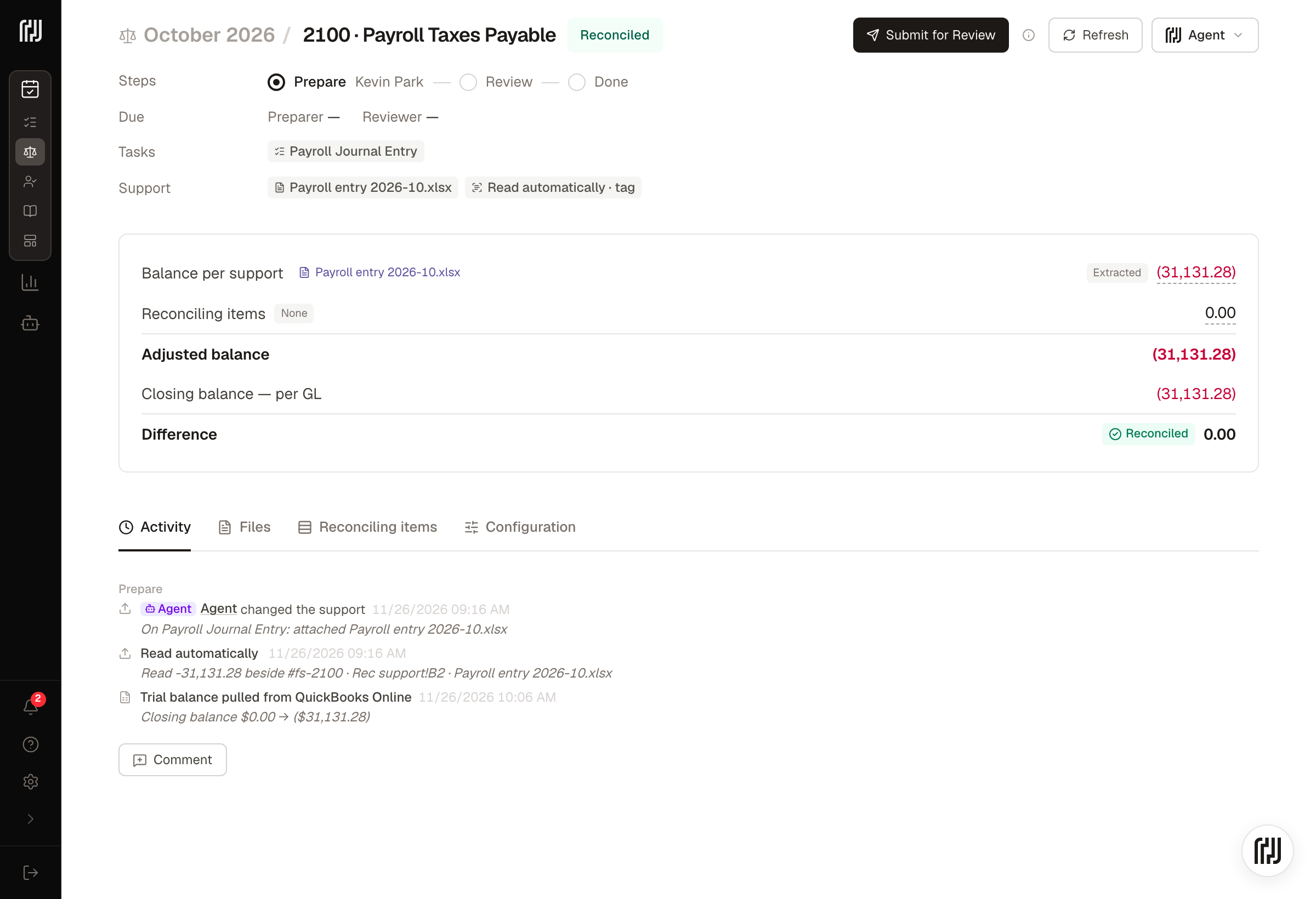
Reconcile balance sheet accounts to their support
The agent prepares the workpaper for each account and compares it to the GL. The support figure is read from the cell tagged for that account, so nobody types it in. Reconciling items and differences over your threshold go to the reviewer.
Build the workbooks and reports you make each month
The board pack, budget vs. actual, flux commentary, a roll-forward schedule. Reports read your books each time they open and calculate the same way every month. Workbooks come with every formula showing.
Work across the systems you already use
Agents write code and connect to your other systems through MCP connections. Here the deferred revenue agent reads order forms in Google Drive, the month’s invoices in Stripe and a go-live date in Slack, builds the rollforward, ties it to the trial balance and drafts the entry. Any task that repeats every month and has a procedure can usually be an agent: describe it, test it on last month, then make it active.
How it works
From your books to a reviewed workpaper
Reads your books and files
Your ERP, your close folder in Google Drive, SharePoint or Egnyte, and other systems through MCP connections. Or a report you upload.
Does the work in code
It writes the calculation in Python, runs it in an isolated sandbox, and builds the workpaper. A formula engine recalculates the workbook, so every figure has a formula.
Hands it to your reviewer
The workpaper and any draft entry land on the close task. Your reviewer checks it and signs off, and the entry posts the way you set it.
Trust
Work you can check before anything posts
Sandboxed
Code runs in an isolated sandbox. The agent acts with set permissions, as the person who started it or as the company’s Agent with its own role, and reaches only the work it was given.
Testable
A test run changes nothing, so you can run an agent on last month and compare it to your team’s workpaper. A new agent stays in Setup until someone makes it active.
Auditable
Every run is recorded with what it changed, every sign-off with who and when, and every figure has its formula. FullSeam is SOC 2 Type 2.
Why FullSeam
Built into your close, not beside it
Part of the close
An agent works on a close task like anyone on your team. When it finishes, the task goes to review, the tasks waiting on it can start, and the close shows what is left.
Shared with your team
Agents, workpapers and runs live in FullSeam, not on one laptop. Anyone with access can run one, review its work or change its procedure. If you use Claude or ChatGPT, connect it to FullSeam and the work is kept there.
Every month, the same way
Agents run on a schedule and roll forward with the close. Next month starts from this month’s workpaper.
Setup
Four ways to set up an agent
From your workpapers and SOPs
Connect your close folder. FullSeam reads last month’s workpapers and your SOP documents and sets up agents to prepare them the same way.
In a chat
Tell FullSeam how you do the task. It asks for what it needs and builds the agent.
From the library
Start from an agent for payroll, accruals, the board pack and more, and adjust it to how you work.
From a Claude skill
Bring a skill or script you already use on the close, and it becomes an agent the whole team can run.
Library
Agents in the library
-
Payroll journal entries
Drafts your payroll journal entry from the payroll register, by department, and accrues wages, bonuses and PTO at month-end, with a workpaper behind every figure.
-
Accrued expenses
Finds expenses incurred but not yet billed, from POs and recurring vendors, and drafts month-end accruals with their reversals and a workpaper.
-
Board and management pack
Builds your monthly management and board pack from your books: P&L, balance sheet, KPIs and commentary, refreshed each month from fixed definitions.
-
Balance sheet reconciliations
Prepares each balance sheet reconciliation from its workpaper support: prepaids, accruals, deferred revenue, payroll liabilities, fixed assets and clearing accounts.
-
Flux analysis
Explains the month’s significant movements, month over month, against the 3-month average and across the last 12 months, from the transactions behind them, and keeps the explanations.
-
Deferred revenue
Works out the month’s revenue from what was billed and delivered, rolls deferred revenue forward in a workpaper, and drafts the revenue entry.
-
Fixed asset depreciation
Rolls your fixed asset register forward, adds the month’s capital purchases, and drafts the depreciation entry with the register as its workpaper.
-
Prepaid amortization
Keeps your prepaid expense schedule current, adds new prepaid bills, and drafts each month’s amortization entry, with the schedule as its workpaper.