
Agents · Balance sheet reconciliations
An AI agent for balance sheet reconciliations
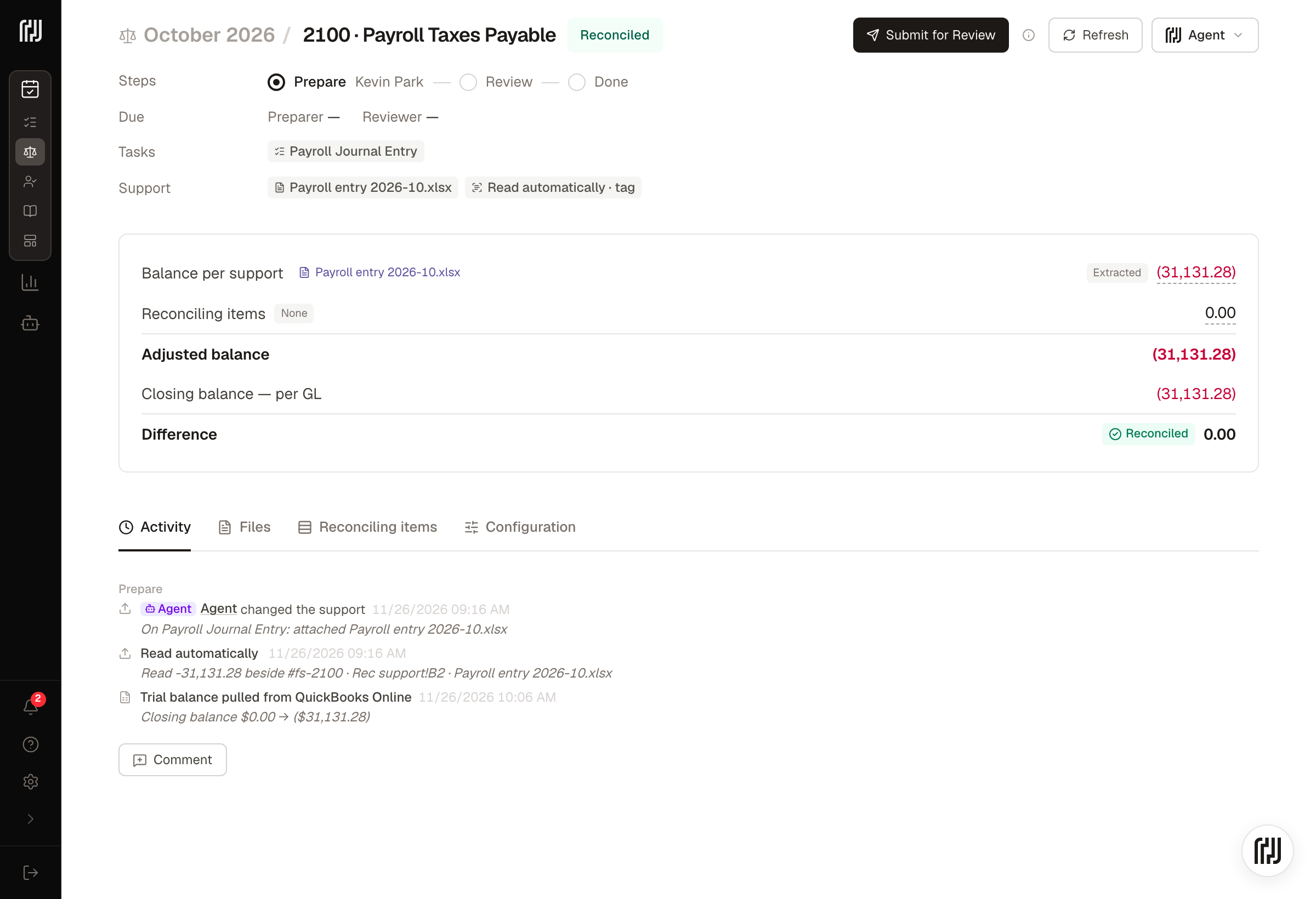
FullSeam’s reconciliation agent prepares the workpaper for each balance sheet account and compares it to the GL. Differences go to your reviewer.
What the agent does each month
Prepares the workpaper
Rolls each account’s schedule forward from last month and this month’s support.
Compares it to the GL
By the closing balance or the month’s activity. The support figure is read from the cell tagged for that account, so nobody types it in.
Lists what is left
Reconciling items and any difference over your threshold, for the preparer and reviewer to sign off.
It works from
- Last month’s reconciliations and workpapers
- Each account’s support
You check before approving
- Each account’s workpaper, with formulas showing
- Reconciling items and differences over threshold
- Preparer and reviewer sign-off
Your ERP
Works with the ERP you have
The agent reads each account’s balance and activity from your books and compares it to the workpaper. Any adjusting entry is drafted for review. The drafted entry posts to your ERP the way you set it: when the reviewer approves it, by the reviewer from the entry, or booked by a person in the ledger.
Nothing moves out of your ERP, and FullSeam isn’t a general ledger. QuickBooks Online connects by signing in, so you can start today. For NetSuite, Xero, Sage Intacct, Dynamics 365 and others, we set up the connection with you after a demo.
Start
Running this month’s close
Sign up free
Create your company and connect QuickBooks Online by signing in. On NetSuite or another ERP, book a demo and we’ll set it up with you.
Set up the agent
Pick “Balance sheet reconciliations” from the agent library, then upload last month’s workpaper or describe how you do it. That becomes the agent’s procedure. A test run changes nothing.
Review each month
You review the workpaper and sign off. Every run is recorded with what it changed.
FAQ
Balance sheet reconciliations FAQ
Which ERPs does it work with?
FullSeam works with the ERP you have. QuickBooks Online connects by signing in, so you can start free today. For NetSuite and other ERPs, we set up the connection with you after a demo. Nothing moves out of your ERP, and FullSeam isn’t a general ledger.
Which accounts can it reconcile?
Balance sheet accounts supported by a workpaper: prepaids, accruals, deferred revenue, payroll liabilities, fixed assets, intercompany and clearing accounts. You pick the accounts when you set it up.
Will our auditors accept these reconciliations?
Each one has its workpaper attached and preparer and reviewer sign-off, and every agent run is recorded with what it changed. FullSeam is SOC 2 Type 2 compliant.
Where do the numbers come from?
From code the agent writes and runs in an isolated sandbox. The workpaper is recalculated by a formula engine, so every figure has a formula you can check, and none is typed in by the model.
Does anything post to our books without review?
Nothing changes without a person’s say. A test run changes nothing, and a new agent stays in Setup until you make it active. A drafted entry posts the way you set it: when the reviewer approves it, by the reviewer from the entry, or booked by a person in the ledger.
What does it cost to try?
Getting started is free. Sign up, connect your books, and set up the agent from the library.